If you want an SRS program, Skritter is the way to go

By Confused Laowai | Date: March 2nd, 2011 | Category: Language

I knew about Skritter for some time now, but never really got around to actually checking it out. After Sara’s recommendation I couldn’t resist anymore and signed up for the trial. Another factor was that the lab that I’m working in now had a Wacom Bamboo tablet lying around. I installed it and never looked back.
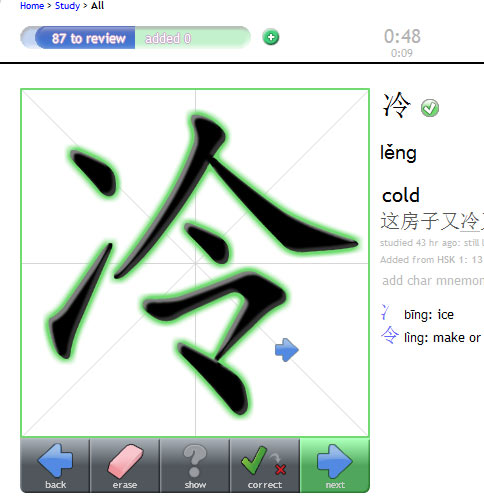
I’ve used Anki before as a way to learn some extra vocabulary while I study. Now that I don’t have formal class anymore, I needed to find a way not only to pickup new words, but keep the old words there. Skritter not only helps me learn words, but it helps me write them. My Chinese writing usually occur on the PC, but I love writing Chinese characters, but sometimes I just can’t find the proper motivation. Skritter offered me that.

One thing that I noticed with Skritter is the ease of use of the program. I immediately understood everything. I’m currently learning to write HSK 1 & 2 again. Most of the words I know, but forgot how to write. Those lists are there, ready to be learned. Secondly, I found using a kinesthetic way of learning vocabulary a refreshing method to other SRS programs. Using a tablet itself is more active and does not feel as boring and monotonous as other SRS programs.

I highly recommend Skritter not only as an SRS alternative, but as a great way to learn how to write words (I’m finally training myself proper stroke order), but as an all inclusive Chinese learning program for tones and definitions as Skritter handles all those aspects as well.

Related posts:

Learning Chinese through Watching TV
The Craziest Chinese Poem I've Seen
The plight of Hollywood Chinese
  • http://www.sarajaaksola.com Sara

    Thanks for the link! I also started with Anki but it was so boring that soon forgot the whole software. Skritter has more and absolutely not so boring, sometimes it’s even fun! And I really like the statistics of my learning.

  • http://niel.delarouviere.com NielDLR

    Oh, yes forgot to mention the stats. Excellent way to keep track of
    your learning. Feedback is essential in programs like this.

  • http://www.carlgene.com/blog Carl Gene Fordham

    I too heart Skritter and recommend it to anyone who wants to improve their written Chinese. I’m only a recent user but was surprised by how intuitive and useful it is. Will definitely sign up for a paid account when I get back from China later this month. :)

  • http://niel.delarouviere.com NielDLR

    Yes, I completely agree. I was amazed at the interface and simplicity,
    one of the few things that learning programs get right.

  • http://twitter.com/GilsonRosa A lira do mercador

    I got addicted to Skritter. It’s much more easier to use than Remembr.it. I tried it once but got lost.
    By the way, it’s pretty amusing and funny read the mnemonic hints posted by other users.

  • Anonymous

    Thanks for the kind words! These ones in particular bowled us over.

    “One thing that I noticed with Skritter is the ease of use of the program. I immediately understood everything.”

    We’ve spent a *lot* of time getting the site to be as intuitive as it is; making a site easy to use is very tricky, we’ve learned. The list page itself was redone maybe six or seven times now, I’ve lost count. Still a lot to do to improve things usability wise, but it’s great to hear our efforts are paying off.

  • http://niel.delarouviere.com NielDLR

    Thanks Scott,

    glad you found my review. For me, many online learning websites or
    learning programs focus too much on the content itself than actually
    user experience design. Skritter did the user experience well, and it
    shows. Thanks for a great product!

    Regards,
    Confused Laowai

  • http://www.skritter.com gsaines

    Hi there Confused Laowai, I just thought I’d share that we added this article to our press page (www.skritter.com/press). It should be viewable after we next upload to the site (probably later today). Thanks for the nice writeup!

  • http://niel.delarouviere.com NielDLR

    Hey, thanks for the adding my post to the press page. That’s great.

    Regards,
    Confused Laowai

  • http://twitter.com/tomschinablog Thomas Aylmer

    I was wondering if you think using the bamboo tablet is nearly the same as writing on paper? I did the Skritter demo but found writing characters with my mouse to be counter productive. I would like to use Skritter but interested to know about the tablets.

  • http://niel.delarouviere.com NielDLR

    Hey Thomas,

    thanks for the comment.
    It is very close. Skritter sometimes auto-completes strokes when you only
    draw a part of it or draw the main idea. It is intuitive, but sometimes it
    is not exactly like writing on paper, but probably the best way to do it.
    I’d recommend getting one!

  • http://twitter.com/tomschinablog Thomas Aylmer

    got one coming in the mail soon, looking forward to starting work with skritter!

  • http://niel.delarouviere.com NielDLR

    Oh yes. I bet you won’t be disappointed! Let me know what you think of the
    service.