Introducing Chinese 3D

By Confused Laowai | Date: July 24th, 2012 | Category: Learning Tools

I feel like I’m seriously missing out by having no iOS device. I can’t play with Skritter and I can’t check out this new app for the iPad 2/3, Chinese 3D. It looks amazing. Check the video and screenshots:

- Based on the Spaced Repetition learning method, one of the psychologically best established and efficient memorization techniques.
- Learn the meaning and pronunciation of the 1200 words from HSK levels 1 to 4. The HSK is the most widely used test of Chinese as a foreign language.
- All words have audio playback, pronounced by native speakers.
- On the new iPad, high resolution is fully supported.
- Teaches simplified characters, the official writing system in Mainland China.
- Teaches Mandarin Chinese pronunciation, the most widely used pronunciation for Chinese.

According to the features, it’s nothing new, but what sets it apart is the totally unique visual way of presenting and categorizing Chinese characters. The lack of good visualizations based on Chinese characters is quite surprising. There are so many ways to get creative with characters. This app seems to do that.
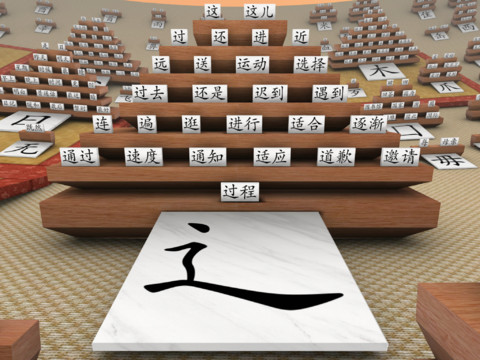
I would love to just explore characters using this app. Unfortunately, I don’t have an iPad 2/3 to check it out. If you have one, please download this app and tell us how it is!

Related posts:

Two More Language Stories from China Travels
Skritter for iPhone launches
Duolingo Launches
FluentFlix first impressions plus beta invites!

Subscribe via email to receive new posts straight in your inbox!

Enter your email address:


  • Pingback: Hao Hao Report

  • Greg

    Hey Niel, I decided to check out this app! The app almost feels like a studying game – it’s hard to tell from the video, but the blocks change color according to how well you’ve mastered the character, which is surprisingly fun. It’s great just looking out over the board and seeing everything you’ve studied. Thanks for bringing this to my attention!

  • http://niel.delarouviere.com NielDLR

    Hi Greg,

    awesome thanks for the comment. Wow, it sounds great! Thanks for trying it out and letting me know.

  • http://www.facebook.com/johebb Joanne Liu

    I like how you can see all the stacks of characters at a glance. It’s a
    really nice visual map of your progress. However, I wish there was a
    speed setting – I feel it’s a bit tedious to use. I don’t think I’d have the patience to use it regularly.
    It just doesn’t have the speed of skritter, other apps – just as a progress overview I love it! Skriter folks – do this!